The $169 Headphones That Help Me Lock In and Study, Even When My Dorm Is Super Noisy
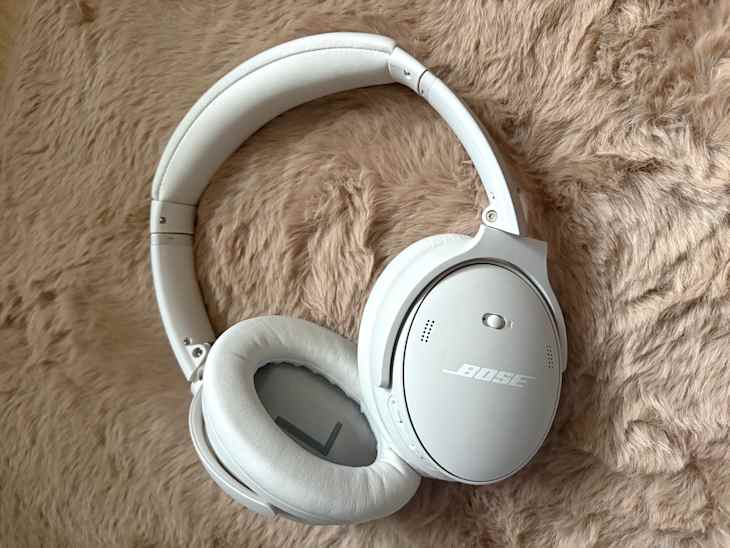
It’s difficult to find a quiet spot on my college campus. Campus buildings are always crawling with students, the library’s “quiet study rooms” are often booked, and even though I live in a single dorm, I can usually still hear noise seeping in from the hallway, neighbors’ rooms, or the New York City streets just outside my building. So, when I saw that the Bose QuietComfort Headphones won a 2026 Dorm Award for the best noise-canceling headphones, my interest was thoroughly piqued.
Luckily, I got the chance to try them for myself when Bose sent me a pair, and they have been an absolute lifesaver when I need a quiet environment to focus on schoolwork or when I just want a moment of peace. After trying them out for two months, here’s my honest review.

What Are the Bose QuietComfort Headphones?
The Bose QuietComfort Headphones are over-ear headphones with multiple noise-cancellation modes. They have removable ear cushions, a built-in microphone, and a secure and adjustable headband. The headphones come with a black carry case, an audio cable (if you prefer that to Bluetooth, which it also has), and a 12-inch USB-C charging cable (though the battery lasts for 24 hours, so I didn’t have to carry it around with me!).
I have these headphones in the color White Smoke (which is currently out of stock), but they also come in Black, Moonlight Grey, Cypress Green, Twilight Blue, Ice Blue, Blue Dusk, Sandstone, Chilled Lilac, and Petal Pink. They usually cost $359, but some colors are currently on sale on Amazon for $169.
These headphones fold to fit inside a flat, rectangular (8.27 x 5.75 x 2.01 inches, about the size of a hardcover book) carry case that fits easily in a backpack or tote bag.
When you’re ready to turn them on and listen to music or a podcast, the free Bose app lets you adjust EQ settings (bass, mid-range, and treble) and create custom listening modes with partial noise cancellation. You can also use the buttons and switches on the headphones to carry out various functions:
- Power and Bluetooth: To turn them on and connect to Bluetooth, slide the switch on the right ear cup (labeled with an R) to the right. To turn them off, slide the same switch to the left. You can also adjust the settings in the Bose app so the headphones power off after a set period of inactivity.
- Volume and Sound: To adjust the volume, press the “+” or “-” button on the right ear cup. To switch between listening modes (quiet, aware, and up to two custom noise modes), press the only button on the left ear cup.
- Music: To play or pause music, press the middle button on the right ear cup — it has three dots on it. Double-pressing this same button to skip to the next track, and triple-press it to return to the previous track.
- Phone Calls: If you have an incoming phone call, press the multi-function button to answer it or press and hold for one second to decline it. While on a call, you can also press the multi-function button to end it or double-press the only button on the left ear cup to mute or unmute yourself.

Why I Love the Bose QuietComfort Headphones
I used the Bose QuietComfort Headphones several times a week during my initial two-month test period , and they’ve had a big impact on my life as a college student living in New York City. They shine brightest when I’m trying to lock in on assignments at the library, but I also use them to listen to music or audiobooks when I’m at the gym, commuting, or trying to fall asleep (especially on a plane!). If I just want silence, I put the headphones on quiet mode (the highest noise cancellation) and wear them without playing any audio. Here’s what makes these headphones so perfect for college life.
They create a quiet zone in noisy areas.
When I lived in a double dorm last year, I’d use earbuds or headphones to listen to music or watch TV at night when my roommate was already asleep. I thought I’d stop needing to do that when I got a single this year, but I still use the quiet mode on my Bose QuietComfort Headphones to drown out the sound of the AC unit in my room and noise from the hallway when I’m trying to work or sleep.
The whirring from my AC unit gets on my nerves sometimes because it’s right next to my desk, and sounds from the hallway carry very clearly into my room — even though my walls are pretty soundproof, my door is not.
They let me listen to music safely when I’m outside.
I also use my headphones when I’m moving around the city. I created a custom listening mode called “commute” that’s set to 50% noise cancellation so that I can tune out the usual din of the NYC subway while staying alert to any announcements or commotion. The same goes for walking around the city: Total noise cancellation would be dangerous in any area with cars or cyclists, so partial noise cancellation is the perfect middle ground to help me relax and listen to my favorite songs while I commute or bop around.
They’re comfortable and easy to maintain.
As the name implies, the Bose QuietComfort Headphones are very comfortable — to the point that I could wear them all day at the library or through the night as I sleep. Or both, since the battery lasts 24 hours (and only takes 2.5 to 3 hours to charge fully)! It’s so convenient that I don’t have to charge them very often, and I can trust that they won’t die on me during the day if they’re fully charged. The headphones are light (8 ounces), and the cushions on the ear cups and under the adjustable headband are soft, so I don’t feel like they weigh me down or squeeze my head.
I want to continue wearing them!
Overall, the Bose QuietComfort Headphones have really helped me turn the volume down when living in the college dorms and in a big city. Plus, I know they’ll still be extremely useful after graduation. I’ve seen people in the office where I intern and subway-goers on their way to work wearing these exact headphones. They’re so sleek and comfortable, and the versatile settings and long battery life make them even more perfect headphones for everyday use.